
Product
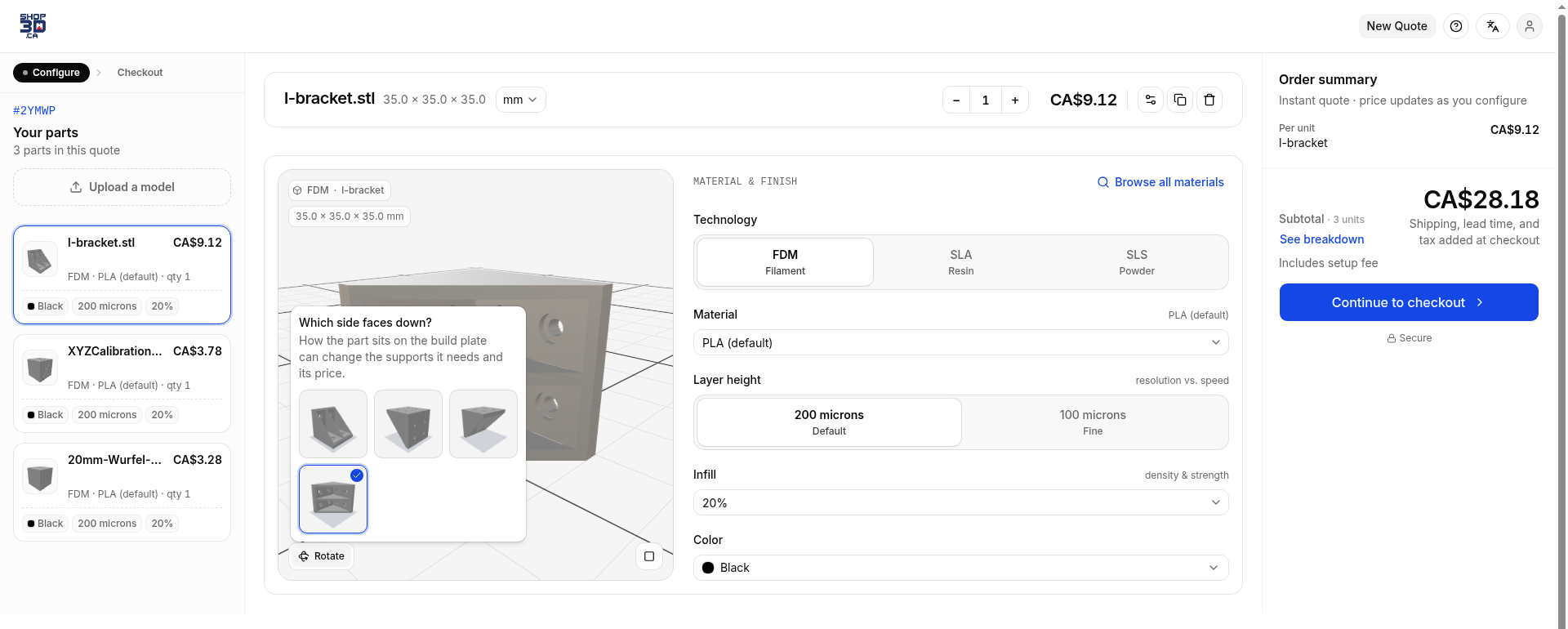
Customers pick which side faces down, and you see it
Customers pick a picture of how their part should sit on the plate, and the price updates. You see their pick rendered on the quote and order.
Published AutoQuote3D team2 min
A customer uploads a bracket, wants the flat face on the plate, and has to guess what "turn 90° about X" will do. So they leave it, then email you to say what they meant. You read the email, find the part, picture it, and hope you got it right.
That back-and-forth is gone.
What changed
- In the widget, Rotate replaces the X, Y, and Z quarter turns. It opens "Which side faces down?" with a picture of each way the part can sit.
- A cube gets six pictures, one for each face. An L-bracket gets four.
- Picking one switches to the 3D view and reprices the part, the same as a turn did before.
- On your side, the part's Print orientation note has a Show button. It opens the uploaded file next to Print it like this, drawn at the same angle the customer saw.
How to use it
- Nothing to turn on. Rotate is live in your widget.
- When a quote or order comes in, open it and find the part.
- Hit Show on Print orientation and check the render before you print.
Saved parts from before this change still load the way the customer left them. STEP and 3MF files are converted before the render shows.
Open your shop and try it on a part. If you want a hand, write support.